Friday, May 28, 2010

Hepsia control panel file manipulation

I have another video from our new and soon-to-be released Hepsia Web Hosting Control Panel. In the introduction video we showed how the new control panel will look, now we will show you our brand new file manager, which has been reworked from ground zero. Our developers received a huge list of needed improvements, gather from our support team, based on both their and user feedback and have done their best to create a top-class control panel.

Hepsia File Manager :


Thanks for reading the Silverthorn Networks company blog!

Sincerely,

-The Silverthorn Networks Team

Monday, May 24, 2010

Sell sole domain name registrations with the Free Reseller Program

To the attention of all our resellers under the Free Program – you can now sell sole domain name registrations, without a hosting plan!

For the moment this functionality is in experimental mode – we want to see how it will behave with out billing system.

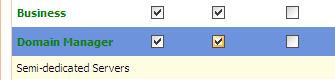
In order to sell domain name registrations (or domain transfers), all you have to do is to enable the Domain Manager plan in the “My Offers” section of the Reseller Control Panel.

http://blog.resellerspanel.com/wp-content/uploads/2010/05/domain-manager-plan.png

Once you do that, update your store with the “Quick Template Update” button and the Domain Manager plan will be available at the order form.

For the moment, it will be available only at the order form, but if there are no serious problems, we will soon activate the plan completely and it will be available also on the reseller templates.

If you have any question regarding this new functionality, don’t hesitate to contact our support staff – they are ready to answer all of your questions.

Thanks for reading the Silverthorn Networks company blog!

Sincerely,

-The Silverthorn Networks Team

Monday, May 17, 2010

Recent problems with PHP scripts

For the past few days several users on different servers have been suffering from an odd issue – their PHP scripts stopped working all of a sudden. After a careful investigation, it turned out that the problem was caused by a recent software update applied to these servers.

The problem usually manifests itself through error messages for wrong paths to CSS configurations or other files. In order to solve it, add the following line to the php.ini file:

cgi.fix_pathinfo = 0

For those of you who don’t know what a php.ini file is – this is the file which contains all the settings of the PHP version your account is using. If you are unsure of how to edit this file, contact our support team – they will happily carry out the update for you.

Thanks for reading the Silverthorn Networks company blog!

Sincerely,

-The Silverthorn Networks Team
Thursday, May 13, 2010

How to install FFMPEG on a Dedicated Server

You want to start a website with videos available for everyone to see? You want to host the videos yourself and not on YouTube or Vimeo? You are using a VPS or a dedicated server? In that case you need to have FFMEG installed on your server.

FFMPEG is a software solution used for encoding and decoding video files before they are presented online. It is powering a good 80% of all the websites offering self-hosted videos. Its installation is very simple but can often scare the novice user, since it requires SSH access to the server. It is also the most frequent software installation request received by our support team. This is why they have written a very detailed guide on how to install FFPMEG on a dedicated server running CentOS.

If you have any problems with the installation, you can always turn to our support team for additional assistance – our techs are well prepared and ready to answer all your questions.

Thanks for reading the Silverthorn Networks company blog!

Sincerely,

-The Silverthorn Networks Team

Tuesday, May 11, 2010

.COM.MX goes cheaper

After a quick check with our domain name prices, it turned out that .COM.MX was one of our most expensive TLDs, with a wholesale price reaching $165.00 USD for two years, or $82.50 USD per year. What’s more, it had to be purchased for at least two years in advance.

In order to allow our domain resellers to increase their market share in Mexico (.COM.MX is the ccTLD for Mexico), we have lowered the price and the registration period for .COM.MX domains.

The new price for .COM.MX domains is: $30 USD per year. The registration period has been decreased to just one year. There are no registration requirements for this TLD.

Here is some additional information about the .COM.MX TLD:

Registration Period
.COM.MX domain names can be registered only for a 1-year period.

Domain Renewal
Domain renewals are valid for 1 year and must be ordered before the domain’s expiration date. If a domain name expires, it gets removed from our account with our registrar and becomes available for registration again at least 16 days after the expiry date.

WHOIS / ID Protection
This service in not available with .COM.MX domain names.

Registrar Change / Transfer
It is possible only to transfer .COM.MX domain names away to another registrar, while transfers to us are not supported by our registrar.

Thanks for reading the Silverthorn Networks company blog!

Sincerely,

-The Silverthorn Networks Team

Friday, May 7, 2010

What is website defacing and how to deal with it?

My site is hacked! – this is one of the most difficult questions for a customer support team to answer.

The most common website attack is Defacing . When a site is being defaced, its home page is changed to something else, usually announcing that this site is hacked by someone. While this is the most noticeable website attack type, it is also the easiest to deal with – a simple backup restore procedure will do the trick. If you have a copy of the home page, this will also help. Sometimes, it’s also possible to simply remove the responsible HTML code.

A more sophisticated form of defacing will extend not only to the home page, but to several other pages as well. Sometimes, the hacker goes so far as to put a code, which will open an HTML frame, leading to a remote content hosted on another server.

In order for someone to “deface” your site, they will need access to your account – such can be gained in several ways – via brute force or dictionary attacks on your administrative login page, SQL injections, XSS attacks or, most trivially, after hacking your email account where your account password is kept.

There are several ways to protect yourself against such attacks:

  • Choose stronger passwords – this has been said many times, but it’s vital – the easiest way for someone to gain access to your site is via a brute force attack, which will try to guess your password or username, generating random characters. This means that the more complex your password is, the harder it will be for someone to hack your site. To prove my point I’ll mention that there’s even a Firefox extension, which allows anyone to launch a brute force attack from their browser!
  • Keep your code updated – if you are using a CMS system, make sure that you are running the latest version possible. This also applies to any plugins you are using.
  • Always keep a backup – make sure that you keep a backup of your site on your home computer, just in case. Keep this backup as fresh as possible.

Thanks for reading the Silverthorn Networks company blog!

Sincerely,

-The Silverthorn Networks Team